Get on the guest list.
Invited by a friend? Send us your Minecraft username below. The island host approves every new crewmate.
Request access →✦ A MINECRAFT WORLD FOR FRIENDS
Build something ridiculous. Find somewhere new.
Make a little corner of the world your own.
Minecraft Java & Bedrock Edition · Friends by invitation
Checking the island…
First time here? Let’s get you aboard EST. IN BLOCKS / BUILT BY FRIENDSSomewhere worth getting lost.
01 / GETTING HERE
Three small steps.
A whole world on the other side.
Invited by a friend? Send us your Minecraft username below. The island host approves every new crewmate.
Request access →Open Minecraft on your computer, phone, tablet, or Switch. Java Edition 26.2 works (older Java versions connect through compatibility), and Bedrock Edition can join too.
Java: choose Multiplayer → Add Server and enter monkeyisland.fyi. Bedrock: add a server with address b.monkeyisland.fyi and port 19132.
Island asleep? Open this site and tap Wake it, or connect once and retry in about a minute.
02 / GET YOUR BEARINGS
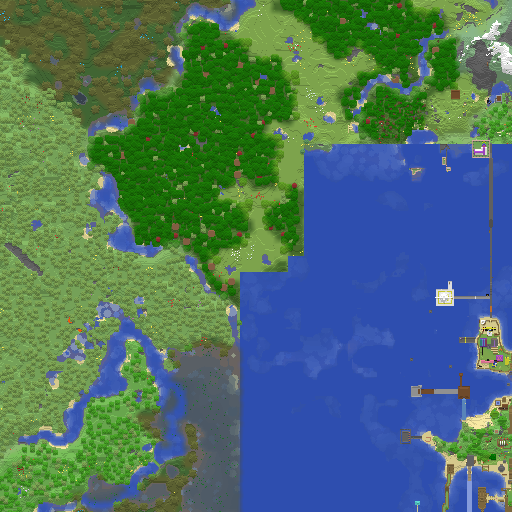
Scout a spot for your next build, retrace an adventure, or just see how the world is growing.
Explore the world mapBrowse the latest rendered terrain, even when the game is asleep. Player locations stay private.
03 / THE VIEW FROM ABOVE
A look at the island’s builds.
Use the arrows to explore.
04 / ROOM FOR ONE MORE
Tell us your Minecraft username and who invited you. Once the host approves your request, you’re ready to join.
A FEW THINGS BEFORE YOU SAIL
The island rests when nobody is playing. Joining wakes it up. Wait about a minute and reconnect; the website and map remain available.
Send the form above and ask your friend to check with the host. Make sure the username you submitted matches the account you’re playing with.
Phones, tablets, Windows, and Nintendo Switch can join with Bedrock Edition — add a server at b.monkeyisland.fyi, port 19132. Xbox and PlayStation don’t allow custom servers without extra setup, so Java or Bedrock on another device is easiest.
Yes, right here on the island. Connect both at once (Java on a computer, Bedrock on a phone/Switch). On Java run /linkaccount <yourBedrockName> to get a 4-digit code, then on Bedrock run /linkaccount <yourJavaName> <code>. Note: once linked you play with your Java account’s progress (inventory, location), so move anything important off Bedrock first.